All Updates
Update
AI learning trail and adjustable prepayment threshold
See exactly which historical transactions inform AI categorisation decisions, plus customise prepayment materiality thresholds.
AI Learning Trail — understand how the model thinks
Briefcase's AI learns from every published transaction and then uses this memory to categorise new transactions.
- Store & learn — Each published transaction is saved to the AI's long-term memory.
- Find the closest match — For every new transaction, the model retrieves the most semantically similar entries to see how they were categorised.
- Decide & apply — It uses that historical context with the fresh data to choose the best category.
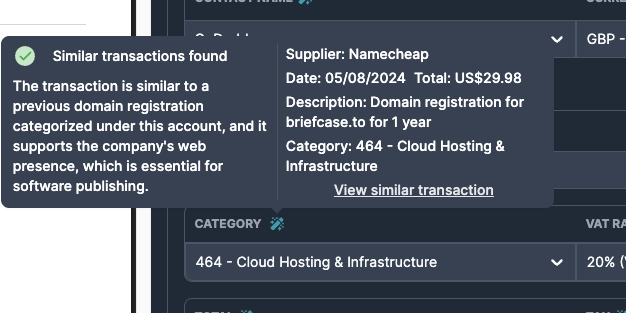
Hover over the magic wand icon beside a category to preview the exact historical transactions the AI considered. Click on similar transaction to open the full record and compare side-by-side.
Prepayments — adjustable materiality threshold
The prepayments module launched last week.
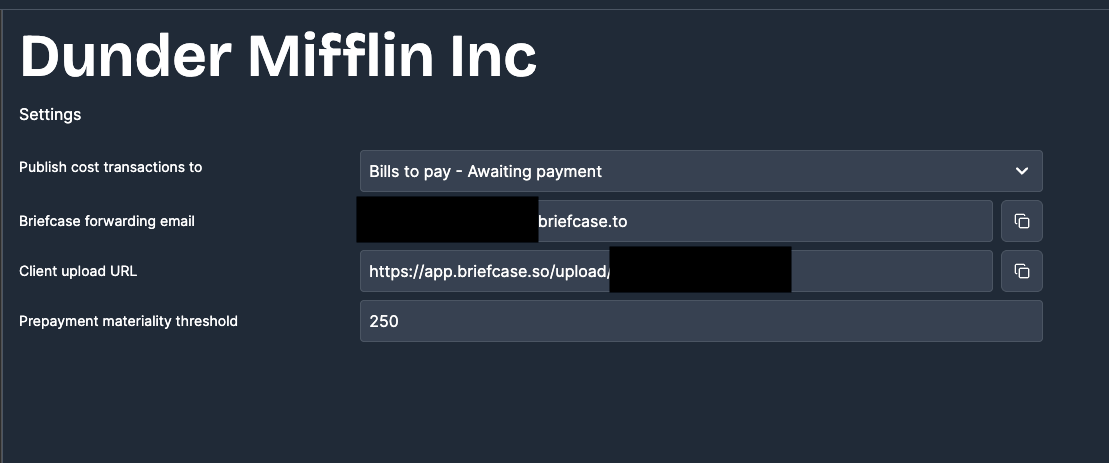
Now users can customise the prepayment materiality threshold (default is 250) from the client settings page. Any invoice with an amount lower than the threshold will not be considered a prepayment.